With the arrival of the Nintendo Switch 2, a generation of cozy gamers faces a uniquely high-stakes logistical challenge. For millions of Animal Crossing: New Horizons players, the console upgrade isn't just about new hardware—it's about moving an entire virtual life. Your island, with its meticulously placed furniture, hybrid flowers, and cherished villager friendships, represents hundreds of hours of peaceful dedication. Unlike nearly every other title in your library, this beloved life-simulator cannot make the jump using standard methods. A special, dedicated process is required to ensure your digital paradise arrives intact on your new console. This comprehensive guide will walk you through every critical step, from deploying the essential Island Transfer Tool to managing your DLC, so you can continue your idyllic adventures without a hitch.
Why Animal Crossing Needs a Special Transfer Tool
The first rule of moving your Animal Crossing: New Horizons island is this: do not use the standard System Transfer. For most games, Nintendo's built-in transfer process seamlessly moves your save data from one console to another. Animal Crossing: New Horizons is a notable and deliberate exception.
This is because your island save data is uniquely tied to the console itself, not just to your user profile. To accommodate this architecture, Nintendo provides a free, dedicated application: the Animal Crossing Island Transfer Tool, available for download on the Nintendo eShop. It is the only sanctioned method for this task.
A critical distinction must be understood: this tool moves your island; it does not copy it. When the process is complete, your island will reside on your new Nintendo Switch 2 and will be permanently removed from your original Switch. This one-way trip is by design, preventing duplicate islands from existing and preserving the game's intended singular community per device.

Pre-Transfer Checklist: Getting Both Consoles Ready
A successful transfer hinges on preparation. Before initiating the process, ensure you have completed the following prerequisites on both your original Switch and your new Switch 2:
- Download the Essential Tool: You must install the free Animal Crossing Island Transfer Tool from the eShop on both consoles. Do not proceed without it.
- Update Your Game: Ensure Animal Crossing: New Horizons is updated to the latest software version on both systems. An outdated game version can cause transfer failures.
- Disable Airplane Mode: The transfer occurs via a direct wireless connection between the two consoles. Airplane Mode must be turned off on both devices to facilitate this.
Taking these few minutes to verify each point will prevent frustrating errors and ensure a smooth transition.
Step-by-Step: Executing the Island Transfer
With both consoles prepared, placed near each other, and connected to power, you can begin the main event.
- Open the Animal Crossing Island Transfer Tool on both your original Switch (the "Source Console") and your Switch 2 (the "Target Console").
- Carefully follow the on-screen prompts. The tool will guide you through selecting which console is sending and which is receiving data.
- The consoles will communicate directly. Once the transfer is initiated and completed, you will receive a confirmation message on both screens.
Important Reminders: As confirmed by the process, your island will no longer be accessible on your original Switch. However, the transfer is reversible. If necessary, you can use the same tool to move your island save data back to the original system, which would subsequently remove it from the Switch 2.
Post-Transfer Steps and DLC Handling
Once the island itself has safely landed on your Switch 2, there are a few housekeeping items to address.
Pro Tip: Don't Forget Your DLC
If you own the Happy Home Paradise DLC, you must re-download it from the Nintendo eShop on your Switch 2 to regain access to the archipelago and its content. This is a separate step from the island transfer process.
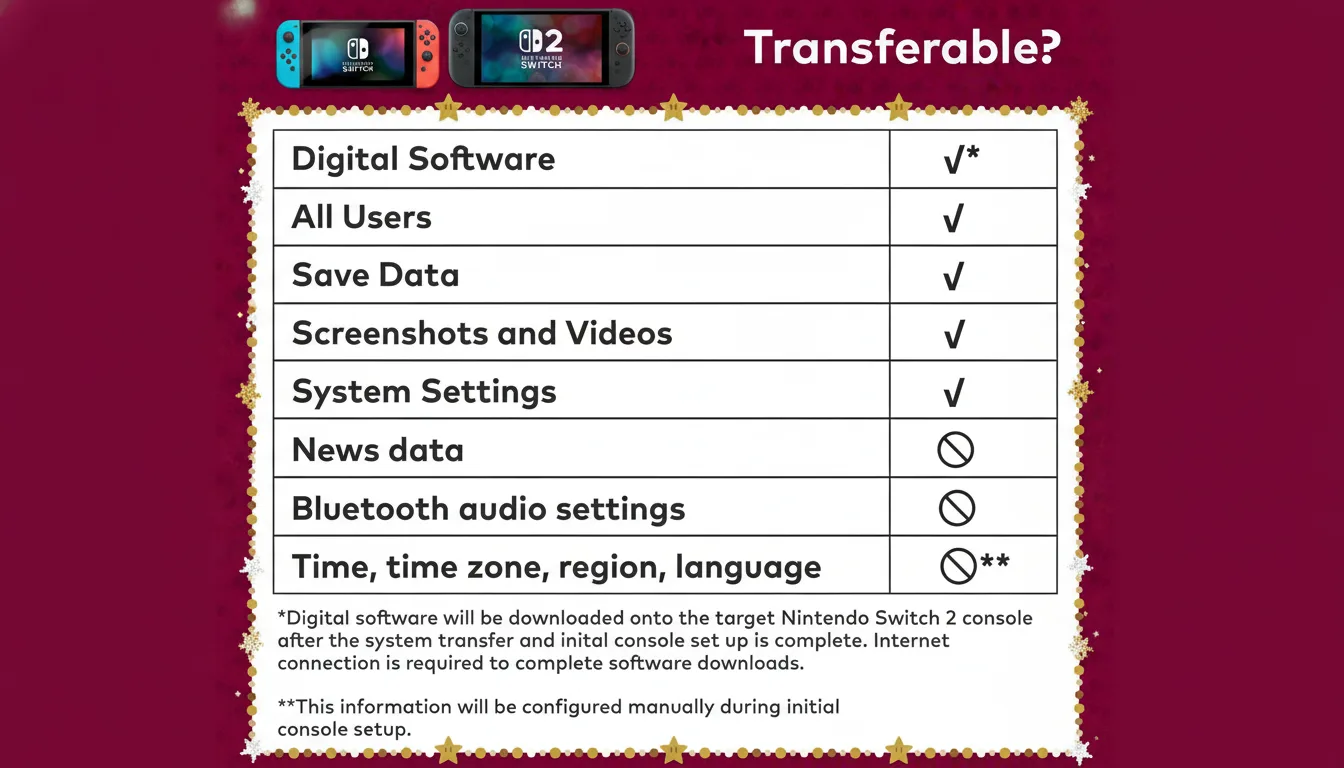
This step mirrors the general post-transfer procedure for other digital titles. After any System Transfer, digital games and DLC must be re-downloaded on the new console, though your purchase history ensures no additional cost. Your Nintendo Switch Online membership, however, transfers automatically with your Nintendo Account, so your cloud saves and other benefits will be immediately available.
General Switch-to-Switch 2 Transfer Tips
While your Animal Crossing island requires its own specific process, you will likely perform a standard System Transfer for the rest of your library. Here are key tips for that broader migration:
- Power and Connection: Keep both consoles charged and connected to a stable Wi-Fi network throughout the process.
- System Updates: Ensure your original Switch's system software is fully updated before beginning the transfer.
- Accessories: Bluetooth accessories like Pro Controllers will need to be re-paired with your new Switch 2.
- Crucial microSD Card Caution: It is recommended to wait until after the system transfer is complete before inserting your old microSD card into the Switch 2. The new console may need to reformat it, which would erase any existing data stored on the card.
Looking Ahead: Preparing for the Future
Transferring your island now not only secures your progress but also positions you for potential future updates. While not officially confirmed by Nintendo, persistent industry reporting and player expectations suggest an enhanced version of New Horizons that leverages new hardware capabilities is a strong possibility. Having your island on the new console would prepare you for such an update should it be released.
Moving your Animal Crossing: New Horizons island is a unique ritual in the gaming world—a specific, careful process to transport a deeply personal creation. By using the dedicated Island Transfer Tool and following each preparatory step, you can execute this digital migration with confidence. Your island, with all its memories and meticulous design, will be waiting for you on the Switch 2, ready for continued daily routines. The path requires patience and attention to detail, but the reward—the seamless preservation of your cozy sanctuary—is well worth the effort.
Tags: Animal Crossing: New Horizons, Nintendo Switch 2, Save Data Transfer, Island Transfer Tool, Gaming Guide


Comments
Join the Conversation
Share your thoughts, ask questions, and connect with other community members.
No comments yet
Be the first to share your thoughts!